For Bitcoin enthusiasts - be advised that there is a Bitcoin Workshop being held in Bristol at 12 midday on Saturday 1st June 2013.
The venue is Cafe Kino, and the topic is "How to Buy, Sell and Host Bitcoin".
Monday, 20 May 2013

Sunday, 31 March 2013
Insanity
About 20 minutes into my first Insanity session, I puked. Then - 10 minutes later - puked again. It may have been the Lucozade, it may have been the early start, but afterwards, I swore never to do it again!
This was forgotten one month later, when - after a belly full of beer - an Insanity advert came on the TV. I announced then and there that I would complete the program! Reality kicked in the very next day.

So what is Insanity?
It's basically an 'at home' fitness program. Watch the video, do the drills (monkey see, monkey do). The only equipment needed is as follows:
- Cross trainers (there is a lot of side to side jumping - my running trainers split after just 4 weeks)
- Pen and paper (for recording results of your 'fit test').
- Water (lots of it!)
- Towel (for mopping sweat. I'm not kidding.)
The program goes like this:


So there are 55 days of workouts during the 63 day program. Some of those days, as you can see, involve two workouts. The asterisk (*) above shows where workouts can be swapped for longer / harder ones if you were lucky enough (like me) to have the 'deluxe' edition.
During month 1, the sessions are between 40 minutes and an hour. During month two, the sessions range from 55 mins to over 1.5 hours. Each session will involve a "warm up", which will ensure that you are effectively broken before you even begin! Followed by stretches, and then the -real- circuits.
None of the circuits are that hard. Individually. It's the stacking of the sessions, coupled with minimal breaks, that leaves you gasping on the floor like a goldfish!
That however, for me, was not the most insane thing about Insanity.
What is so insane about Insanity?
To put it bluntly - fitting it into your life! This is what takes serious willpower and commitment. After a session, you need to wait another 10-15 minutes just to stop sweating. So overall - excluding shower time (presumably you'd do that anyway!) - you are looking at fitting in between 55mins and 1hr 45mins of additional activity, 6 days a week for two months!
Not only that - you need space. Enough to properly jump around in. I have been travelling a lot, which has meant occasionally lifting up the bed and moving it into the hallway to make room!

Places I have done insanity:

The verdict
There are many critics of this program, and many have started it. However - very few have finished it! I would say this has got nothing to do with 'fitness' and everything to do with.. willpower. It takes serious willpower to complete the 63 days.
At the end of it, you most certainly will be a lot fitter. You will experience the incredible satisfaction of recording your final fit test score. But - best of all - it will be over!! And 'normal life' can resume..

This was forgotten one month later, when - after a belly full of beer - an Insanity advert came on the TV. I announced then and there that I would complete the program! Reality kicked in the very next day.

So what is Insanity?
It's basically an 'at home' fitness program. Watch the video, do the drills (monkey see, monkey do). The only equipment needed is as follows:
- Cross trainers (there is a lot of side to side jumping - my running trainers split after just 4 weeks)
- Pen and paper (for recording results of your 'fit test').
- Water (lots of it!)
- Towel (for mopping sweat. I'm not kidding.)
The program goes like this:
Month1

Month 2

So there are 55 days of workouts during the 63 day program. Some of those days, as you can see, involve two workouts. The asterisk (*) above shows where workouts can be swapped for longer / harder ones if you were lucky enough (like me) to have the 'deluxe' edition.
During month 1, the sessions are between 40 minutes and an hour. During month two, the sessions range from 55 mins to over 1.5 hours. Each session will involve a "warm up", which will ensure that you are effectively broken before you even begin! Followed by stretches, and then the -real- circuits.
None of the circuits are that hard. Individually. It's the stacking of the sessions, coupled with minimal breaks, that leaves you gasping on the floor like a goldfish!
That however, for me, was not the most insane thing about Insanity.
What is so insane about Insanity?
To put it bluntly - fitting it into your life! This is what takes serious willpower and commitment. After a session, you need to wait another 10-15 minutes just to stop sweating. So overall - excluding shower time (presumably you'd do that anyway!) - you are looking at fitting in between 55mins and 1hr 45mins of additional activity, 6 days a week for two months!
Not only that - you need space. Enough to properly jump around in. I have been travelling a lot, which has meant occasionally lifting up the bed and moving it into the hallway to make room!

Places I have done insanity:
- Kendal
- Halifax
- Catterick
- Bristol
- Swindon
- Longmoor
- Minehead
- Paignton
- France (Paris)
- Germany (Dusseldorf)
- On the beach
- In the dark (with a head torch)
- Outside in the rain

The verdict
There are many critics of this program, and many have started it. However - very few have finished it! I would say this has got nothing to do with 'fitness' and everything to do with.. willpower. It takes serious willpower to complete the 63 days.
At the end of it, you most certainly will be a lot fitter. You will experience the incredible satisfaction of recording your final fit test score. But - best of all - it will be over!! And 'normal life' can resume..

Tuesday, 4 December 2012
Online Storage
Have you ever bought a new laptop PC? Or felt the need to access your files from another device - such as your phone? Or a work computer?
Wouldn't you agree that its an absolute pain to have your files stored somewhere you can't access them? Like on a broken PC? Or a laptop that has been stolen from you? (Imagine losing all those photos - forever!)
Of course there is an answer, and its been around for years. You should be storing ALL your important documents in the CLOUD!
Thankfully this is easier than ever with a whole range of providers offering free services (such as google docs). However there are a couple which I think are worthy of special mention:
SafeSync
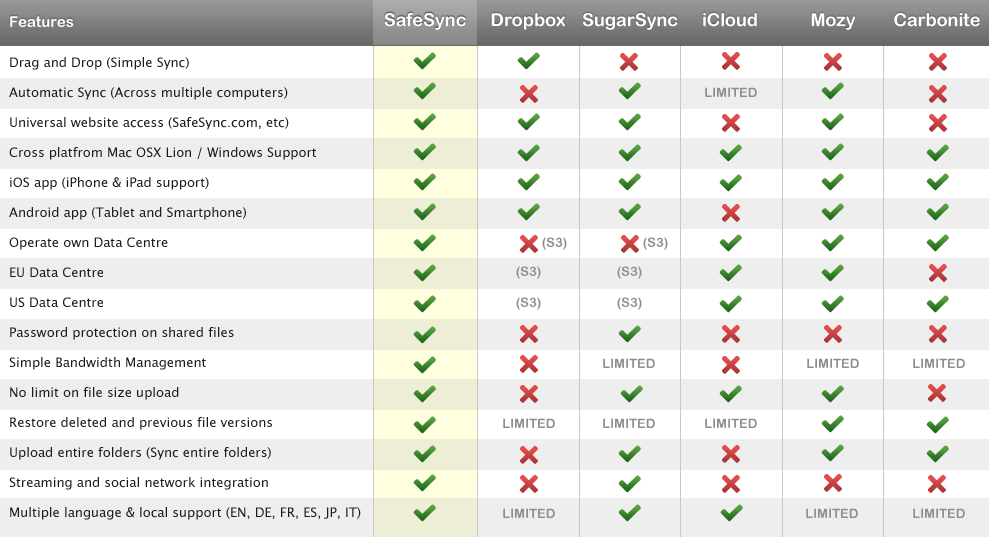
I subscribe to SafeSync, and get 100gb of storage for approx £50 per year. SafeSync offer great services such as ability to share documents with non-subscribers, retrievable backups, android / iphone access, search facility and the ability to play videos / music etc direct from source (ie without downloading). SafeSync are - quite simply - the BEST storage providers on the web (and in fact cheaper than DropBox for paid services).

DropBox
Whilst I think SafeSync is the best option for storing (precious) documents online, the fact is that most people don't like to pay for stuff! Which is why DropBox is my second recommendation. The great thing about dropbox is not that you get 2gb of storage for free (you get this with google docs), but that you can then use referrals to increase this up to 18gb.

Both DropBox and SafeSync offer applications which can be downloaded to your pc, so you can still work offline (away from the internet) and have the peace of mind to know that all your files will be backed up in the cloud as soon as you reconnect.
Never lose a photo again! Click to join up:
Wouldn't you agree that its an absolute pain to have your files stored somewhere you can't access them? Like on a broken PC? Or a laptop that has been stolen from you? (Imagine losing all those photos - forever!)
Of course there is an answer, and its been around for years. You should be storing ALL your important documents in the CLOUD!
Thankfully this is easier than ever with a whole range of providers offering free services (such as google docs). However there are a couple which I think are worthy of special mention:
SafeSync
I subscribe to SafeSync, and get 100gb of storage for approx £50 per year. SafeSync offer great services such as ability to share documents with non-subscribers, retrievable backups, android / iphone access, search facility and the ability to play videos / music etc direct from source (ie without downloading). SafeSync are - quite simply - the BEST storage providers on the web (and in fact cheaper than DropBox for paid services).
DropBox
Whilst I think SafeSync is the best option for storing (precious) documents online, the fact is that most people don't like to pay for stuff! Which is why DropBox is my second recommendation. The great thing about dropbox is not that you get 2gb of storage for free (you get this with google docs), but that you can then use referrals to increase this up to 18gb.

Both DropBox and SafeSync offer applications which can be downloaded to your pc, so you can still work offline (away from the internet) and have the peace of mind to know that all your files will be backed up in the cloud as soon as you reconnect.
Never lose a photo again! Click to join up:
Thursday, 15 November 2012
Wordpress accepts Bitcoin
News just in - the worlds 22nd most accessed site in the world now accepts Bitcoin! Why? Because it allows access for bloggers from approx 60 countries that would not otherwise be able to use their services, due to the restrictive policies of Paypal and credit card companies.
Besides - Paypal is expensive!
As noted on the WordPress website, it is still not particularly easy to get hold of Bitcoins. However one mechanism that you could use is Bitmit - basically 'ebay for Bitcoin'. You can even sell cash for Bitcoins! Alternatively, MtGox - the worlds biggest Bitcoin exchange - allows bank transfers from most major countries. For business owners out there - they even have an app you can use to receive Bitcoins as payment..
Besides - Paypal is expensive!
As noted on the WordPress website, it is still not particularly easy to get hold of Bitcoins. However one mechanism that you could use is Bitmit - basically 'ebay for Bitcoin'. You can even sell cash for Bitcoins! Alternatively, MtGox - the worlds biggest Bitcoin exchange - allows bank transfers from most major countries. For business owners out there - they even have an app you can use to receive Bitcoins as payment..
Monday, 12 November 2012
Mind Mapping with MindMeister
Today I'm going to show you around my favourite mind mapping tool - MindMeister.
I first subscribed to MindMeister approx 2 years ago, when it was the first to deliver an Android mind-mapping capability. They are still at the forefront of this industry, having just been selected by google as their preferred partner for delivering mind maps via Google Docs (sorry, google DRIVE!).
What should you look for in a mind mapping provider?
Here is a screenshot of my homepage:

And here is a (very basic) mind map. This is actually a lot bigger, I have collapsed it to fit on the screen:

Basically, mind maps are BRILLIANT for quickly getting to grips with a concept or idea, allows you to create links to other nodes (or other mind maps), you can share and collaborate on mind maps (in REAL time! see below).. You can post links / images / files etc on each node. Mind maps are awesome.
So how do you get started with mind maps? Simples. Click here!
I first subscribed to MindMeister approx 2 years ago, when it was the first to deliver an Android mind-mapping capability. They are still at the forefront of this industry, having just been selected by google as their preferred partner for delivering mind maps via Google Docs (sorry, google DRIVE!).
What should you look for in a mind mapping provider?
- Wide range of mind map formats (.mind, .mm, .mmap, .xmind)
- Web based functionality (so you can access your mind maps from any device)
- Android / iPhone compatibility
- Ease of sign on (re-use your google account, openid or facebook login)
- Market leader (you don't want your provider to go bust and lose all your maps)
Here is a screenshot of my homepage:

And here is a (very basic) mind map. This is actually a lot bigger, I have collapsed it to fit on the screen:

Basically, mind maps are BRILLIANT for quickly getting to grips with a concept or idea, allows you to create links to other nodes (or other mind maps), you can share and collaborate on mind maps (in REAL time! see below).. You can post links / images / files etc on each node. Mind maps are awesome.
So how do you get started with mind maps? Simples. Click here!
Saturday, 8 September 2012
Interrobang?!?!?!?!?!?!?!?!?!?! wtf‽
Watching a programme tonight (apparently it was called "QI") and they discussed a punctuation mark known as the interrobang. This symbol combines ? and !, and is used in rhetorical questions. How useful is that‽

The interrobang was first proposed by Martin K Speckter in 1962 in the magazine TYPEtalks. It was subsequently included in the release of the Americana typeface in 1966, and there was even an interrobang key on some Remington typewriters by 1968. During the 1970s it was possible to purchase interrobang keycaps and typefaces for certain Smith-Corona typewriters.
 Ultimately.. the interrobang failed to become a standard punctuation mark. However it is available in WingDings 2 (press the "]" key) as well as Calibri (the default Office 2007 font). It is also a unicode character - so you can get it in many applications by holding ALT and typing 8253. The actual unicode encoding is U+203D however this can be converted by setting your windows calculator to scientific / programmer mode, setting the base to HEX and typing 203D - then switching back to DEC (gives 8253). In order for the character to display in html, you can use "& #8253;" (without the space).
There is even a dedicated website - would you believe it‽‽‽‽‽
The interrobang was first proposed by Martin K Speckter in 1962 in the magazine TYPEtalks. It was subsequently included in the release of the Americana typeface in 1966, and there was even an interrobang key on some Remington typewriters by 1968. During the 1970s it was possible to purchase interrobang keycaps and typefaces for certain Smith-Corona typewriters.
There is even a dedicated website - would you believe it‽‽‽‽‽
Saturday, 23 June 2012
Wimbleball 2012 - Results
Race completed! Full results available here. My time was about an hour quicker than expected - a total of 6hr 20mins. That puts me 562nd out of the 1265 who actually finished in the allotted 8.5 hours.

For comparison purposes, here are some of the people I knew at the event:


For comparison purposes, here are some of the people I knew at the event:
| Name | Swim | Transition | Bike | Transition | Run | Overall | Rank | |
| Philip Graves | 00:22:33 | 00:02:26 | 02:29:35 | 00:01:24 | 01:23:44 | 04:19:45 | 1 | |
| Chris Thorne | 00:38:33 | 00:07:43 | 03:23:08 | 00:01:57 | 02:02:56 | 06:14:19 | 484 | |
| Allan Bowe | 00:46:27 | 00:08:20 | 03:25:30 | 00:02:10 | 01:58:09 | 06:20:38 | 562 | |
| Lisa Pritchard | 00:38:00 | 00:07:34 | 03:48:06 | 00:04:27 | 02:07:40 | 06:45:48 | 806 | |
| Matt Francis | 00:55:01 | 00:08:18 | 03:53:29 | 00:03:22 | 02:15:34 | 07:15:46 | 1017 | |
| Sally Hughes | 00:40:24 | 00:11:44 | 04:44:50 | 00:05:28 | 02:47:30 | 08:29:59 | 1265 |
I don't know Philip or Sally but their first / last places put our results in context!

So how did it go? Well - it wasn't the best start.. We were given an official 15 min delay anyway, due to site traffic access issues, compounded by the fact that - following the official start announcement (to move to the lake) - I realised that Emma still had my swim hat and goggles! So I had to run off and try to find her (which I did). I was then left (with Matt and Lisa) running towards the lake, suddenly stuck behind all the 'second wave' green hats, as the commentator shouted for the red-hats to hurry up! Once in the lake, treading water at the back, I didn't realise the start gun had gone off (I was using ear plugs). However I quickly got the picture, and began my longest-ever unbroken swim. Not much to say on this stage, but special mention to the green hat who - after whacking my feet several times - proceeded to pretty much 'swim over me'. Its not like there was a lack of swimming space in Wimbleball lake!!

Transition one was a big one, with an 800m jog to the changing area. Then onto the bike stage. This was a very hilly circular route of the lake, followed by - a repeat of the very hilly circular route! This wasn't too bad actually, as I was using Emma's dads hybrid (as opposed to my mountain bike). However I was constantly overtaken by those on racing bikes (except on the uphills).

Transition two went well and onto the run. Owch!! Very quickly discovered the effect that clip-on pedals have on your calves, and was slowed to an embarrassing walk on the (numerous) uphills. Managing not to swear at (presumably well-meaning) members of the public encouraging me to 'run a little bit', I sped up after two laps, to a sprint finish and sub-2 hour half marathon.

Learning points:
- wear two swim hats in case someone knocks yours off (this happened to Matt)
- earplugs helped me with the swim (apart from missing the start!)
- have a WEAK energy drink concentration in your bike bottle (mine was way too strong and made me thirsty)
- take spare shoes when setting up transition!! (After dropping off my running trainers, I spent Saturday walking around in the mud and rain in bare feet)
- a track pump is useful for race morning
- make sure your cycle gloves are the right way round (cold post-swim hands are not the best for getting into inside-out gloves)
- use a tri-wetsuit (makes a MASSIVE difference to your swim)
- take toilet roll on race morning!! as the portaloos are heavily used!!
- have both a long & short sleeve top in your cycle bag, so you can choose dependent on weather.
Moaning Points:
My biggest beef with this event (which I guess applies to most races) is the appalling attitude of competitors with regard to discarding used energy gels / sweet wrappers etc. I saw several cyclists, in their tight lycra and expensive bikes, throwing rubbish into the Exmoor countryside.
My second grumble is the attitude of some visitors towards the event marshalls (who were volunteers from the local rotary club). Wimbleball is fairly remote, with single track lanes, so traffic management is clearly a challenge with around 2000 visitors to the site. Anyway, it was a shame that one particularly grumpy old man - angry at the delays - deliberately attempted to run over one of the marshalls, injuring his leg!! Luckily there were lots of witnesses, details were taken, and police notified.
Summary
Given my lack of training, am very happy with the result. Am putting it down to a combination of determination, and the nutritional supplements that Emma regularly plies me with. However - am also aware that it was only half an Ironman. So watch this space!!

Subscribe to:
Posts (Atom)